Imagine putting instructions on a small product label where there is barely enough room for the product name. Instead of squeezing every detail onto the label, you could place a text QR code beside it so people can scan and read the instructions when needed.
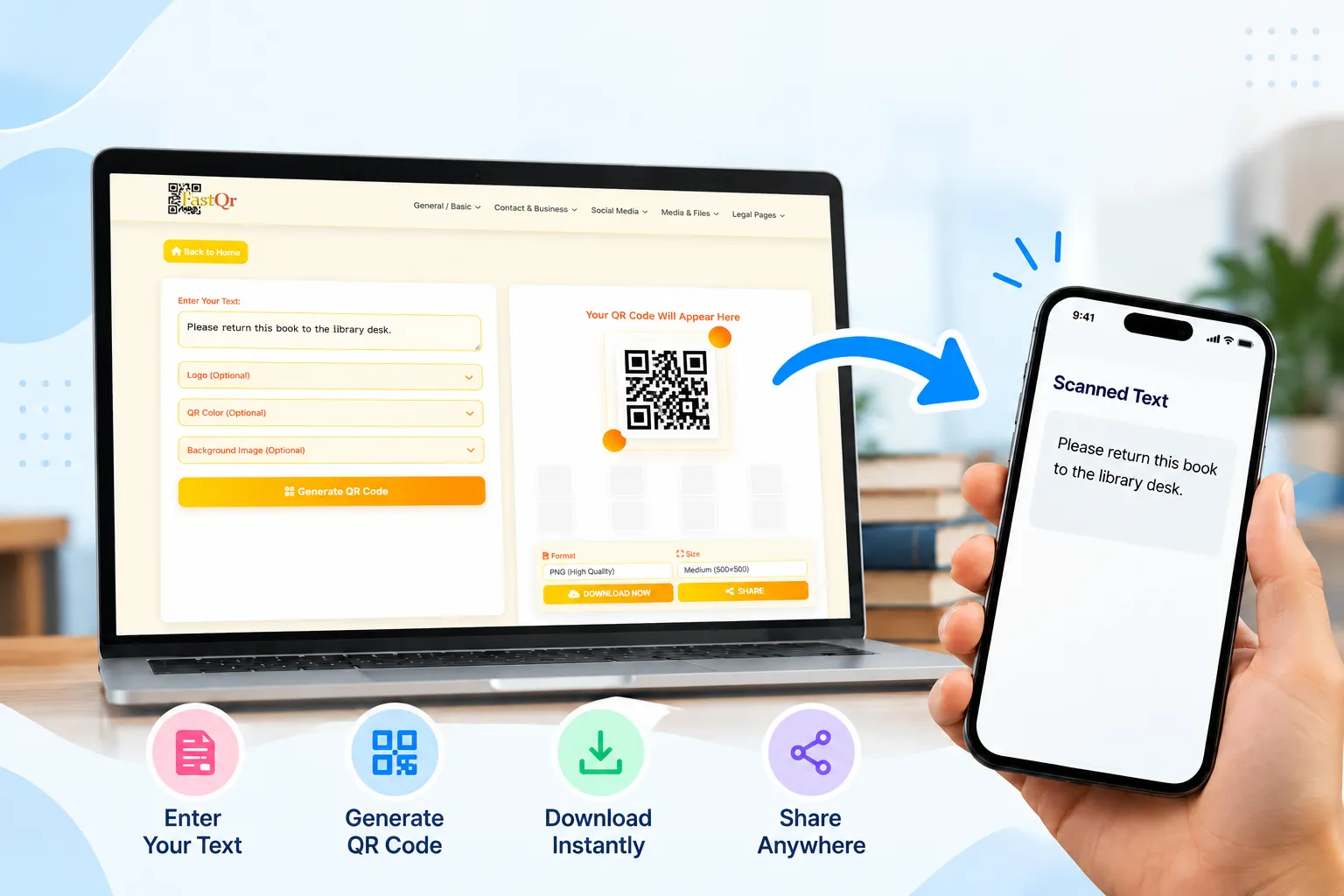
With FastQR.in, you can enter your message, generate a QR code and download the image. Before printing it on labels or notices, scan the saved image to check that the message appears correctly.
With FastQR.in, you can enter your text, generate a QR code, and download it for sharing or printing. The process is straightforward, even if you have never created a QR code before.
What Is a Text QR Code?
A text QR code is a type of QR code that stores written information rather than simply directing a user to a website. When someone scans the code with a compatible camera or QR code scanner, their device can display the encoded text.
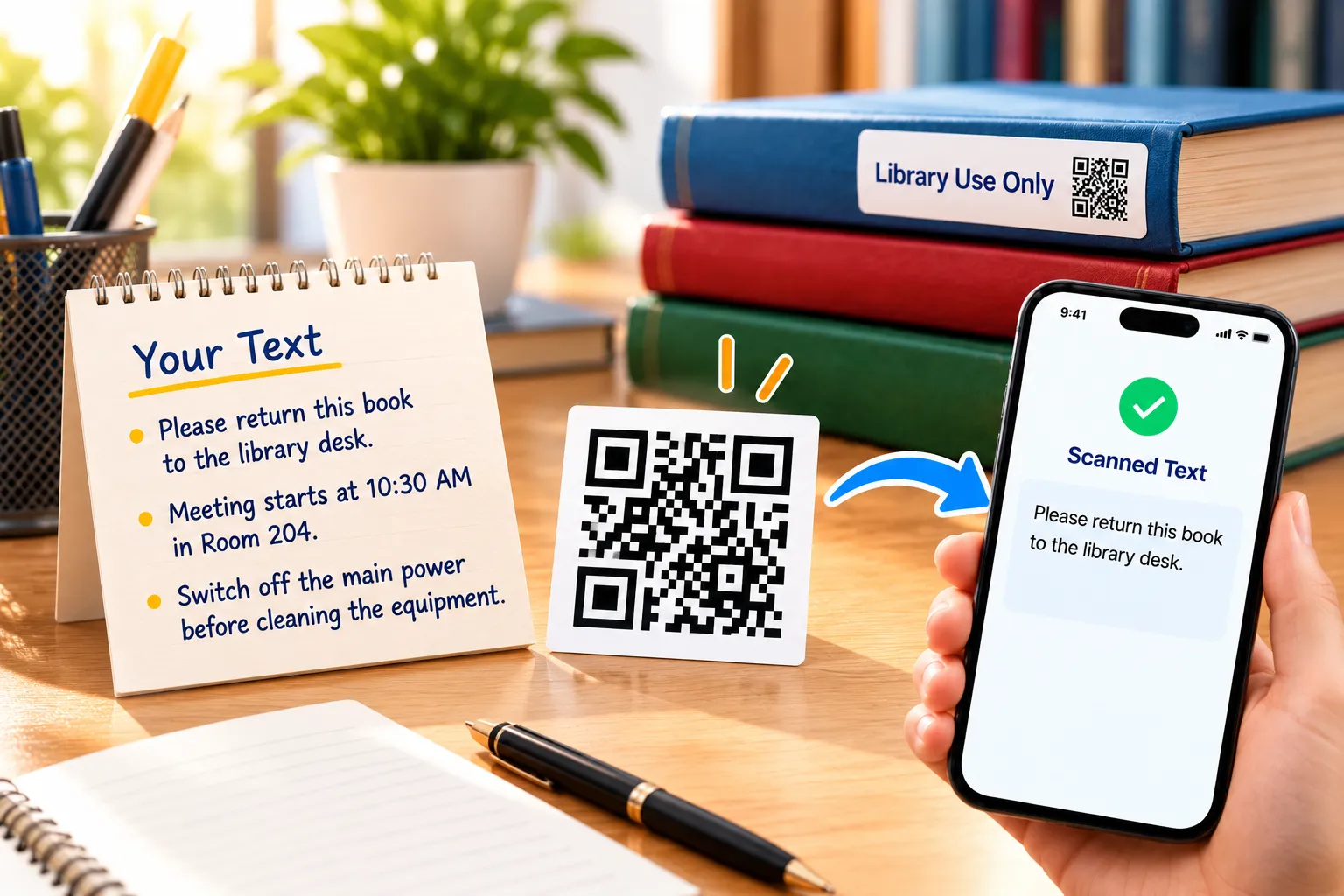
For example, you could create a QR code containing:
“Once you finish reading, leave the book at the library counter.”
“Your meeting is scheduled for 10:30 AM in Room 204.”
“Before cleaning the equipment, make sure the main power supply is turned off.”
“Welcome! Please check in at the reception counter.”
Instead of printing the entire message on a small label, you can print the QR code and let readers scan it when they need the information.
A QR code generator for text is the tool that turns this written content into a scannable code. A plain text QR code does not necessarily require a website link, account, or internet connection to display its contents. The exact experience depends on the encoded data and the scanning device.
How Does a Text QR Code Generator Work?
A text QR code generator encodes your written content into a machine-readable pattern of dark and light squares. That pattern is called a QR code.
When a compatible scanner reads the pattern, it decodes the information and presents the result to the user.
Here is the basic process:
Enter your text: Type the message, note, instructions, or other written information you want to share.
Generate the QR code: The generator converts your text into a scannable pattern.
Download the code: Save the generated image using the download option available on the tool.
Share or print it: Place the image on a label, document, poster, worksheet, or other suitable material.
Scan and read: The recipient scans the code with a compatible phone or QR code reader to access the information.
The key advantage is that the information can be carried inside the code itself. You do not need to create a separate webpage just to share a short written message.
Why Is a Text QR Code Generator Useful?
Sharing written information becomes easier when people can retrieve it by scanning a code instead of typing the message themselves. A text QR code can be placed on printed materials, displayed in a shared workspace, or included in learning resources. It offers a practical way to distribute short information without taking up much physical space.
For workplaces, a QR code can provide quick access to routine reminders and standard operating instructions. However, when procedures are frequently revised, a maintained online document may be a better choice because the information can be updated centrally.
Text QR codes can also help with everyday organisation. You might use one to share a packing list, leave a reminder for a group, or display instructions alongside an item.

Practical Uses of a QR Code for Text
The best way to understand text QR codes is to look at situations in which they solve a real problem.
Education and classroom notes
Teachers can use a QR code for classroom notes, revision reminders, short exercise instructions, or library information.
For example, a worksheet could contain a code with the following message:
“Revision task: Review chapters three and four. Complete questions one to five before the next class.”
Students can scan the code instead of copying the entire instruction from a board.
Product labels and packaging
A QR code for product information can contain brief usage notes, handling instructions, or storage reminders.
A package containing a small component might include a code that reads, “Keep in a dry place. Store away from direct sunlight.”
For complex products, however, a short text QR code is not a replacement for a complete manual. Check that all mandatory product and safety information remains available in the required format.
Business instructions
Offices and workplaces often display repeated instructions on equipment, storage areas, or shared facilities.
A text QR code could provide a reminder such as, “Return shared equipment to the marked shelf after use.”
Keep messages clear and concise. If employees need a detailed procedure that changes regularly, a managed document or webpage may be more appropriate.
Events and exhibitions
Event organisers can create QR codes containing venue directions, session reminders, check-in instructions, or brief notices.
For example, a notice near an event entrance could contain: “Registration for the afternoon session begins at 1:30 PM at the information desk.”
For frequently changing schedules, use a suitable updateable information source instead of relying on a static text code.
Personal reminders and messages
A text QR code can also be used for personal organisation. You could encode a packing checklist, a short reminder, or a message for someone who needs specific information.
For shared or public locations, avoid putting private information into a code that anyone can scan.
Emergency and safety instructions
A code can provide additional guidance for routine procedures, equipment identification, or non-urgent reference information.
However, never make a QR code the only place where critical emergency instructions are available. Someone may not have a working phone, a suitable scanner, or enough time to scan it. Display essential warnings and emergency directions visibly, and follow applicable safety requirements.
Text QR Code vs URL QR Code
Both types use the same familiar square pattern, but they serve different purposes.
| Feature | Text QR code | URL QR code |
|---|---|---|
| Main purpose | Shares encoded written information | Opens a web address |
| Typical result after scanning | Displays or offers the encoded text | Opens or offers a website link |
| Requires a webpage | Not necessarily | Yes, for the destination |
| Can information be updated? | Usually requires generating a replacement code | The webpage can be updated while its URL stays the same |
| Useful for | Notes, short instructions, messages | Articles, online forms, manuals and detailed resources |
| Internet requirement | Often unnecessary to read the embedded text | Usually required to access online content |
The right option depends on what you want people to do. Choose a text QR code when the message itself is the main content. Choose a URL QR code when people need to visit a webpage, open a document, or access information that may change over time.
How to Make Your Text QR Code Easier to Scan
Generating a code is only the first part of the job. It must also work reliably in the place where people will use it.
Keep the message focused. Include the information the reader actually needs. Removing unnecessary words can help keep the code less dense.
Use a clear image. Download the generated image at its available quality and avoid stretching it out of proportion. Enlarging a small image excessively can make its edges less clear.
Maintain strong contrast. A dark code on a light background is generally a reliable choice. Avoid low-contrast colour combinations or busy backgrounds behind the pattern.
Choose a practical print size. There is no single size that works for every situation. The right dimensions depend on the amount of encoded data, print quality, viewing distance, and scanner. Test the actual printed result rather than relying on a universal minimum.
Leave clear space around the code. Keep text, borders, logos, and decorative elements away from the code's edges. The surrounding blank area helps scanners identify the QR code correctly.
Test with different devices. Where possible, scan the image using more than one compatible phone. Check the final printed version, not only the image displayed on your computer.
Make the purpose clear. Add a short label such as “Scan to read instructions.” People are more likely to use a code when they understand what it contains.
Is a Free Text QR Code Generator Safe to Use?
A QR code is a way to encode information, not a guarantee that the information is trustworthy or private.
Before entering text into an online QR code generator, check the site's privacy information and understand how it handles submitted content. Do not assume that text entered into a web tool is automatically private.
Avoid encoding passwords, financial information, access codes, confidential business details, or sensitive personal information into a QR code intended for broad distribution. Anyone who obtains a readable copy of the code may be able to access its contents.
Also remember that a QR code can be copied and redistributed. If the message contains information that should only reach a specific person, choose a more suitable sharing method.
For ordinary, non-sensitive notes and instructions, a text QR code can be a convenient option. Review the content before creating the code, test the output, and share it only where appropriate.
Create Your Text QR Code with FastQR.in
If you need a straightforward way to turn written information into a scannable image, a text QR code generator can save time and make printed materials more useful.
With FastQR.in, you can enter your text, generate the corresponding QR code, and download the image for your intended use. Before sharing it widely, scan the downloaded file and check that the complete message appears correctly.
Whether you are preparing classroom notes, product instructions, workplace reminders, or a short message, start with clear text and test the finished code in the setting where it will be used.
Ready to get started? Visit FastQR.in and try the free Text QR Code Generator. Turn your written message into a QR code and make it easier for others to access the information they need.
Frequently Asked Questions
1. What is a text QR code?
A text QR code stores written information in a scannable QR pattern. When a compatible phone or scanner reads the code, it can display the encoded message without necessarily opening a website.
2. How can I make a text QR code without paying?
Visit FastQR.in and open the text QR code creation tool. Add the message you want to share, generate the code, and save the resulting image using the available download option. Scan the saved image before distributing it to confirm that it displays the correct information.
3. Can I convert plain text into a QR code?
Yes. A plain text QR code generator converts written content into a scannable pattern. The generator must support the content you enter, especially if it is lengthy.
4. How can I turn a paragraph into a QR code?
Copy the paragraph you want to share and paste it into a text QR code generator that supports its length. Create the code, then scan it with a compatible device to check that the complete message can be retrieved. Keep in mind that longer text creates a more complex QR pattern, which may require a larger image or print size for reliable scanning.
5. Can a QR code store text without a website link?
Yes. A QR code can encode text directly rather than a URL. A compatible scanner can read the stored message without visiting a website.
6. How do I scan a QR code to read text?
Open a compatible phone camera or QR code scanner, point it at the code, and follow the on-screen prompt. Depending on your device, the encoded text may appear directly or in a preview.
7. Can I print a text QR code on paper?
Yes. You can print a downloaded text QR code on paper, labels, posters, worksheets, or cards. Test the printed copy to make sure the code scans reliably.
8. How much text can a QR code contain?
The maximum depends on the QR code's version, encoding mode, and error-correction level. Standard QR codes can hold thousands of characters in certain configurations, but practical limits depend on the tool and the type of text. For reliable scanning, shorter content is often preferable.
9. Is it possible to put a personal message inside a QR code?
Yes. You can turn a written message into a scannable QR code using a text QR code generator. This can be useful for sharing reminders, brief announcements, greetings, or instructions. Enter your message, create the code, and test the result to ensure that the intended text is displayed correctly.
10. Does a text QR code work without an internet connection?
The encoded text can often be read offline because it is stored in the QR code itself. However, scanning functionality depends on the device and its available software. A QR code that points to a website generally needs an internet connection to load that destination.
11. Can I download a text QR code as a PNG?
If the generator provides a PNG download option, you can save the code in that format. Check the available download formats in FastQR.in before publishing claims about a specific file type.
12. What is the difference between a text QR code and a URL QR code?
A text QR code stores the written message itself, while a URL QR code stores a web address. The first is useful for self-contained messages; the second is better when readers need access to a webpage or information that may change.