Last year, a local retailer printed 10,000 promotional flyers with a QR code linking to a special offer. The campaign looked great on paper, but customers struggled to scan the code because it was printed too small. As a result, engagement was far lower than expected.
Situations like this are more common than many businesses realize. A QR code can connect customers directly to websites, payment pages, menus, contact details, and promotions—but only if it scans instantly.
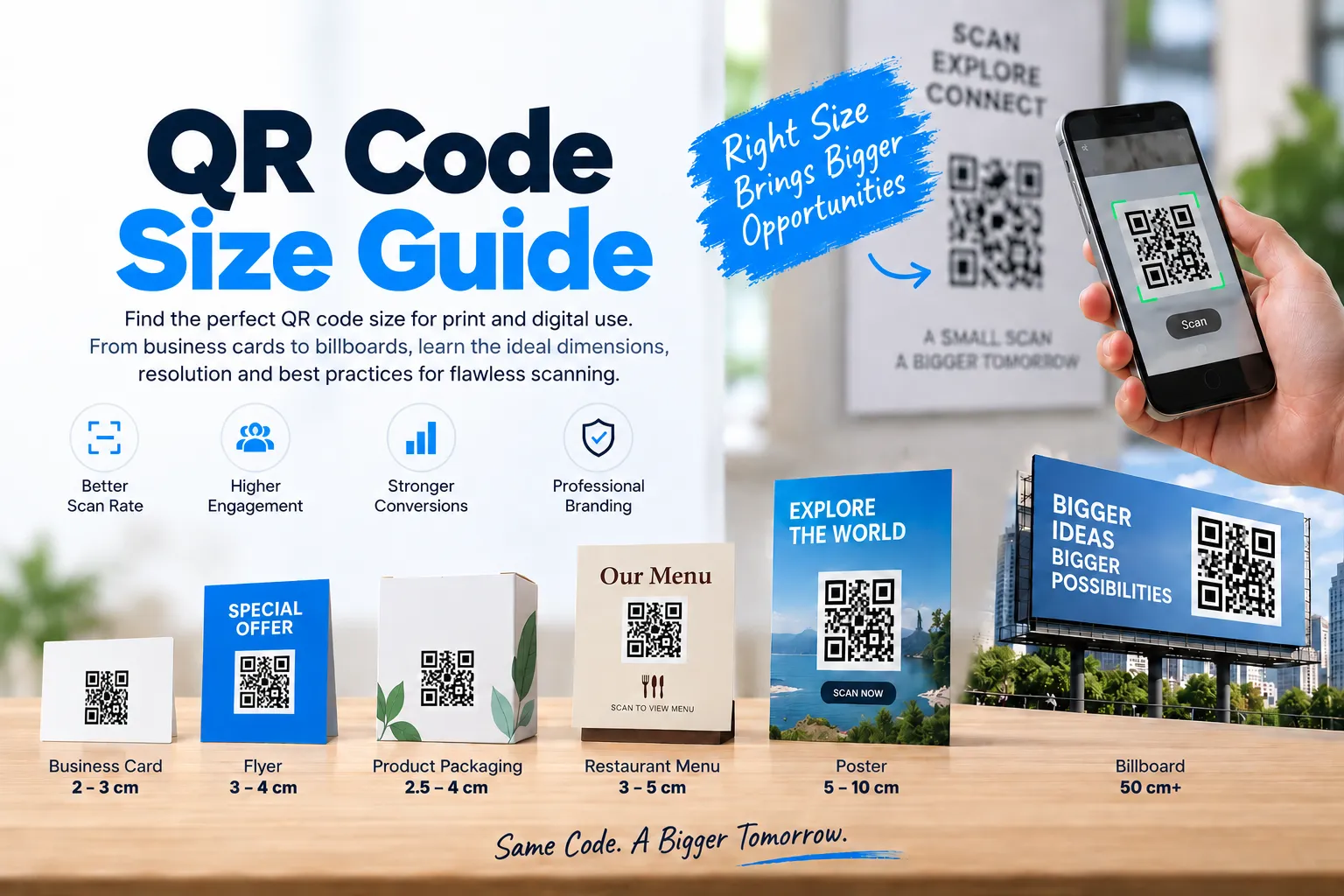
In this QR Code Size Guide, you'll learn the ideal QR code dimensions for business cards, flyers, posters, packaging, menus, and large-format advertising. We'll also cover print resolution, sizing formulas, common mistakes, and practical recommendations to help ensure your QR codes work reliably in real-world conditions.
Why QR Code Size Matters
A QR code works by storing information in a pattern of black and white modules. When a smartphone camera scans the pattern, it decodes the data and directs the user to a website, app, contact information, payment page, or other digital content.
If a QR code is too small, blurry, distorted, or printed at low resolution, scanners may struggle to read it accurately.
Choosing the correct size affects:
- Scan success rate
- User experience
- Marketing campaign performance
- Customer engagement
- Conversion rates
- Brand perception
Even a perfectly generated QR code can fail if the dimensions are inappropriate for its viewing distance.
Understanding QR Code Dimensions
Before selecting a print size, it helps to understand what QR code dimensions actually mean.
A QR code consists of:
- Data modules
- Quiet zone (empty space around the code)
- Finder patterns
- Alignment patterns
The overall dimensions include both the encoded data and the required quiet zone.
For example:
- Small QR codes may contain fewer modules.
- Larger QR codes containing more data require additional space.
- The more information stored inside a QR code, the denser the pattern becomes. Dense patterns typically require larger printing dimensions to remain easily scannable.
Minimum QR Code Size: The Golden Rule
One of the most frequently asked questions is:
What is the minimum QR code size?
A commonly accepted guideline is:
Minimum QR Code Size = 2 cm x 2 cm (0.8 inch x 0.8 inch)
This size works for many simple QR codes viewed at close range.
However, this should be considered the absolute minimum rather than the ideal size.
For better scan performance, many experts recommend:
3 cm x 3 cm (1.2 inch x 1.2 inch)
This provides greater reliability across different smartphone cameras and lighting conditions.
QR Code Sizing Formula
A useful industry guideline is:
10:1 Distance Rule
For every 10 units of scanning distance, the QR code should be at least 1 unit wide.
Examples:
| Scanning Distance | Recommended QR Code Size |
|---|---|
| 20 cm | 2 cm |
| 50 cm | 5 cm |
| 1 meter | 10 cm |
| 2 meters | 20 cm |
| 5 meters | 50 cm |
This simple rule helps determine the correct size based on how far users will stand when scanning.
QR Code Sizing Chart
The following QR code sizing chart provides practical recommendations.
| Use Case | Recommended Size |
|---|---|
| Business Cards | 2–3 cm |
| Flyers | 3–4 cm |
| Brochures | 3–5 cm |
| Product Packaging | 2.5–4 cm |
| Restaurant Menus | 3–5 cm |
| Posters | 5–10 cm |
| Store Displays | 8–15 cm |
| Banners | 15–30 cm |
| Billboards | 50 cm+ |
Using this QR code sizing chart can significantly improve scanning success rates.
QR Code Size for Business Cards
Business cards have limited space, making QR code placement challenging.
Recommended Size
2 cm x 2 cm to 3 cm x 3 cm
Best practices:
- Place the QR code on the back side.
- Avoid overcrowding the design.
- Use high contrast.
- Maintain a proper quiet zone.
A QR code on a business card often links to:
- Website
- LinkedIn profile
- Digital contact card
- Portfolio
- Appointment booking page
Testing the printed card before mass printing is essential.
QR Code Size for Flyers
A common question is:
What size should a QR code be for printing on flyers?
Flyers are usually viewed at arm's length, allowing slightly larger codes.
Recommended Flyer Size
3 cm x 3 cm to 4 cm x 4 cm
Benefits include:
- Faster scanning
- Better visibility
- Improved campaign engagement
Flyers often contain promotional offers, event registrations, landing pages, and product information.
QR Code Size for Posters
Posters are generally viewed from greater distances.
Recommended Poster QR Code Size
5 cm x 5 cm to 10 cm x 10 cm
Factors affecting poster QR code dimensions:
- Viewing distance
- Placement height
- Indoor or outdoor location
- Lighting conditions
A poster displayed at a bus stop or shopping mall should use a larger QR code than one placed in a reception area.
QR Code Size for Product Packaging
Product packaging presents unique challenges because available space varies significantly.
Recommended Packaging Size
2.5 cm x 2.5 cm to 4 cm x 4 cm
Packaging QR codes are commonly used for:
- Product information
- User manuals
- Warranty registration
- Authenticity verification
- Customer support
When printing on curved surfaces, always test the final package to ensure readability.
QR Code Size for Restaurant Menus
Digital menus became extremely popular in recent years.
Recommended Menu QR Code Size
3 cm x 3 cm to 5 cm x 5 cm
Restaurant QR codes should:
- Scan quickly
- Be easy to locate
- Have clear instructions nearby
Placing a tiny QR code in a crowded menu design often frustrates customers.
QR Code Size for Large Format Advertising
Large-format advertising requires special attention.
Examples include:
- Outdoor banners
- Exhibition booths
- Event signage
- Hoardings
- Billboards
Recommended Sizes
| Format | Suggested QR Size |
|---|---|
| Banner | 15–30 cm |
| Trade Show Booth | 20–40 cm |
| Large Signage | 25–50 cm |
| Billboard | 50 cm+ |
Always calculate size according to expected scanning distance.
QR Code Resolution Guide
Size alone is not enough.
A QR code can be physically large but still fail if the resolution is poor.
Recommended Resolution
For print:
- Minimum: 300 DPI
- Preferred: 600 DPI
For digital use:
- PNG
Why DPI Matters
DPI stands for Dots Per Inch.
Higher DPI provides:
- Sharper edges
- Better module definition
- Improved scanning accuracy
Low-resolution QR codes often appear blurry when enlarged, making them difficult to scan.
QR Code Print Quality Guide
Good print quality is just as important as proper sizing.
Best Practices
Use High Contrast
Best combination:
- Black QR code
- White background
Avoid:
- Light gray
- Pastel colors
- Low-contrast designs
Maintain Quiet Zone
Leave empty space around the QR code.
The quiet zone should be at least four modules wide on all sides.
Avoid Distortion
Never:
- Stretch
- Compress
- Warp
A distorted QR code can become unreadable.
Test Before Printing
Always scan using:
- Android devices
- iPhones
- Different camera apps
Testing prevents expensive reprints.
Common QR Code Size Mistakes
Many businesses unknowingly reduce scan performance through avoidable mistakes.
1. Making the QR Code Too Small
Small codes often fail in real-world environments.
2. Using Low Resolution
Pixelated images reduce readability.
3. Removing Quiet Zones
The scanner needs empty space around the code.
4. Poor Color Choices
Low contrast decreases recognition accuracy.
5. Overloading Data
Excessive data creates dense patterns requiring larger dimensions.
6. Ignoring Viewing Distance
A QR code on a billboard cannot use the same size as a business card.
QR Code Size Recommendations by Industry
Retail
Recommended size:
3–5 cm
Uses:
- Product information
- Loyalty programs
- Discounts
Real Estate
Recommended size:
5–10 cm
Uses:
- Property listings
- Virtual tours
- Agent contact details
Healthcare
Recommended size:
3–5 cm
Uses:
- Patient information
- Appointment booking
- Medical records
Education
Recommended size:
3–6 cm
Uses:
- Course materials
- Student portals
- Event registrations
Events
Recommended size:
5–10 cm
Uses:
- Ticket validation
- Registration
- Venue information
How to Test Your QR Code Before Printing
Before sending materials to a printer:
Step 1
Print a sample.
Step 2
Place it at the intended viewing distance.
Step 3
Test on multiple devices.
Step 4
Check scanning speed.
Step 5
Verify destination content.
Step 6
Review under different lighting conditions.
A few minutes of testing can save significant costs later.
Creating Perfectly Sized QR Codes with FastQR
If you're creating QR codes for marketing campaigns, packaging, events, business cards, or promotional materials, choosing a generator that supports high-quality exports is important.
With FastQR, you can:
- Generate high-resolution QR codes
- Download print-ready formats
- Customize designs while maintaining scan reliability
- Use QR codes across print and digital campaigns
Whether you need a QR code for a small business card or a large advertising banner, starting with a high-quality QR code file helps ensure successful scanning.
Real-World QR Code Scan Testing
| QR Size | Distance | Result |
|---|---|---|
| 2 cm | 20 cm | Good |
| 3 cm | 50 cm | Excellent |
| 5 cm | 1 m | Excellent |
| 10 cm | 2 m | Excellent |
| 15 cm | 3 m | Good |
Frequently Asked Questions (FAQ)
1. What size should a QR code be for printing?
The recommended size depends on viewing distance. For most printed materials, a QR code between 3 cm and 5 cm works well.
2. What is the minimum QR code size?
A minimum size of 2 cm x 2 cm is generally recommended, though larger sizes improve scanning reliability.
3. What is the best QR code size for flyers?
For flyers, 3 cm x 3 cm to 4 cm x 4 cm provides excellent scanning performance.
4. What is the ideal QR code size for posters?
Posters typically require QR codes between 5 cm and 10 cm depending on viewing distance.
5. Does QR code resolution matter?
Yes. Print-quality QR codes should be generated at a minimum of 300 DPI, with 600 DPI preferred for professional printing.
6. Can a QR code be too large?
Large QR codes generally scan well, but they should remain proportional and maintain proper resolution.
Conclusion
The best QR code size depends on where and how people will scan it. A business card QR code may work well at 2–3 cm, while a poster or billboard often requires a much larger size to remain readable from a distance.
Rather than choosing a size based solely on available space, consider viewing distance, print quality, lighting conditions, and device compatibility. A few minutes spent testing before printing can prevent scanning issues later.
If you're creating QR codes for marketing campaigns, product packaging, restaurant menus, events, or business materials, FastQR makes it easy to generate high-quality QR codes optimized for both print and digital use.